B2B ecommerce in India
For Indian manufacturers and distributors: dealers order online at their own prices, on credit within a limit, and see what they owe.
Dealer and distributor ordering portal
Your dealers and distributors sign in at /portal on your store’s address and order for themselves: by product code, from a spreadsheet, or by repeating last month’s order. They see their own prices, how much credit is left and what they owe. Their staff’s big orders wait for the owner’s approval, and you see every order, quote and overdue amount in one admin.
Everything below is in the portal today. The screenshots further down are the real screens.
| You need | What it does today |
|---|---|
| Sign in and see their account | A dealer portal on your own web address. Dealers sign in at /portal on your store’s own address. They see their payment terms and what they owe, order, approve their staff’s orders, accept quotes and download statements. There is no separate website to build first, and it works in a phone’s browser. |
| Order fast by code | Order by product code or spreadsheet. Dealers type product codes and quantities, paste them from a spreadsheet, or upload the spreadsheet itself, up to 500 lines at a time. Lines that cannot be added come back with their row number and the reason, such as too little stock. |
| Order the same again | Repeat an order. Put a past order back in the basket at today’s prices, and order only the lines you tick while the rest wait in the basket. |
| Their own prices | A price list per dealer category. Put dealers in groups, such as distributors, A-category and B-category dealers, and give each group its own price list. Prices can drop at quantities you set, and a list can run between two dates, for a scheme. |
| Know how much credit is left | Credit limits that stop an order. Each dealer has a credit limit. At checkout, what they already owe plus the new order’s final total is checked against it, and an order over the limit is refused before it exists, with the amount still available shown. Two orders placed at the same moment cannot both slip under one limit. |
| Pay later | Orders on account. A dealer with an account orders now and pays later. The order is confirmed straight away with a due date, say 30 days out, and the amount counts against their limit until you mark the order paid. |
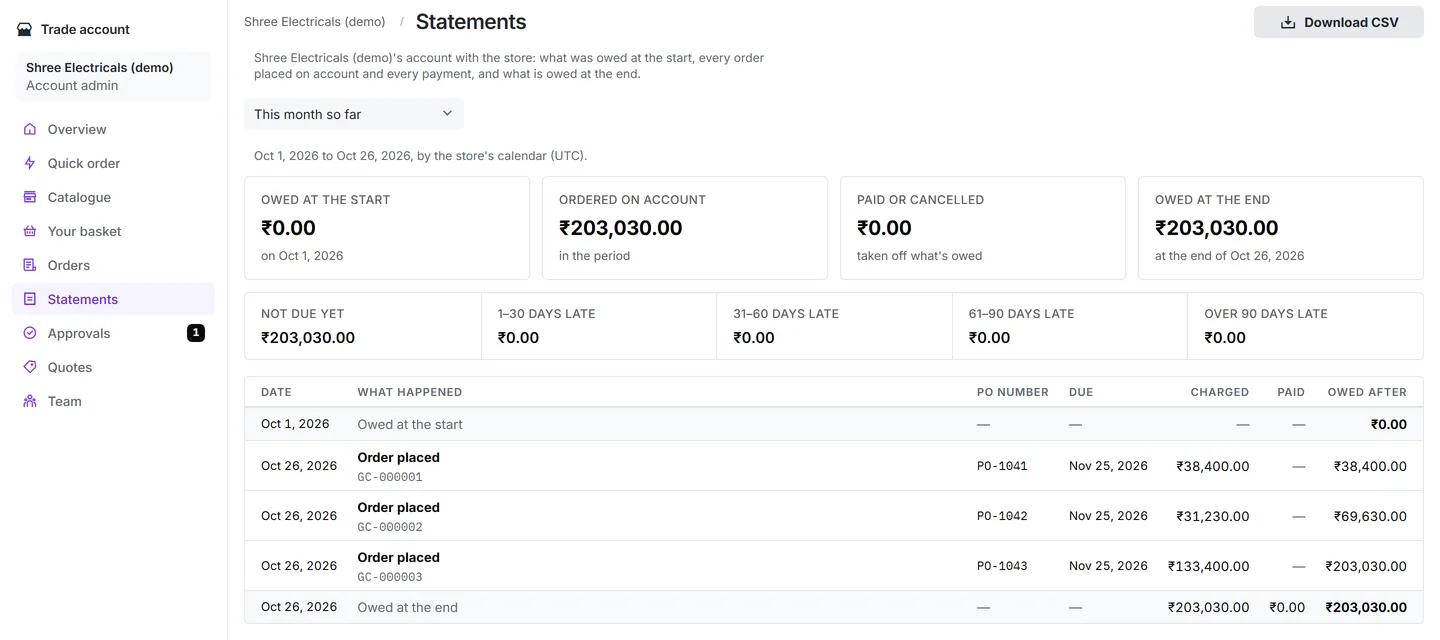
| A statement any time | Statements and overdue amounts. A statement for any period: what was owed at the start, every order and payment, and what is owed at the end, with unpaid money split into not yet due, 1–30, 31–60, 61–90 and over 90 days late. You see every dealer’s; a dealer’s owner sees their own, and either can download it as a spreadsheet. |
| Approve their staff’s big orders | The owner approves big orders. Set an amount per dealer. When a dealer’s staff member orders above it, the order waits, and the dealer’s owner or approver is emailed to approve or reject it. Approved orders go through at the prices the approver saw. |
| Ask for a better price | Quotes. A dealer asks for a price on a quantity. Your team prices each line, adds a note and an expiry date, and sends it. When the dealer accepts, the order is placed at exactly those prices. |
| Add their own staff | The dealer’s own team. A dealer’s owner invites their staff by email as buyers or approvers, and changes or removes them without calling you. |
| Put their PO number on the order | Purchase order numbers. Every order can carry the dealer’s PO number, and you can make it required for a dealer. |
| Only the ranges they deal in | What each dealer may buy. Limit a dealer to some categories and products. Their checkout, quick orders and quotes keep to it. |
| Leads from customers in their area | Dealer territories. Give each dealer a territory: a country, a state or a PIN code prefix. An enquiry from a customer on your website goes to the dealer whose territory fits best, and that dealer is emailed and follows it up in the portal. You see every enquiry and can reassign it. |
| A store of their own | A store per dealer. From one installation you can open a separate online store for each dealer or brand, each with its own team, admin and web address. |
Screens from the portal itself, with a made-up demo dealer and sample products.
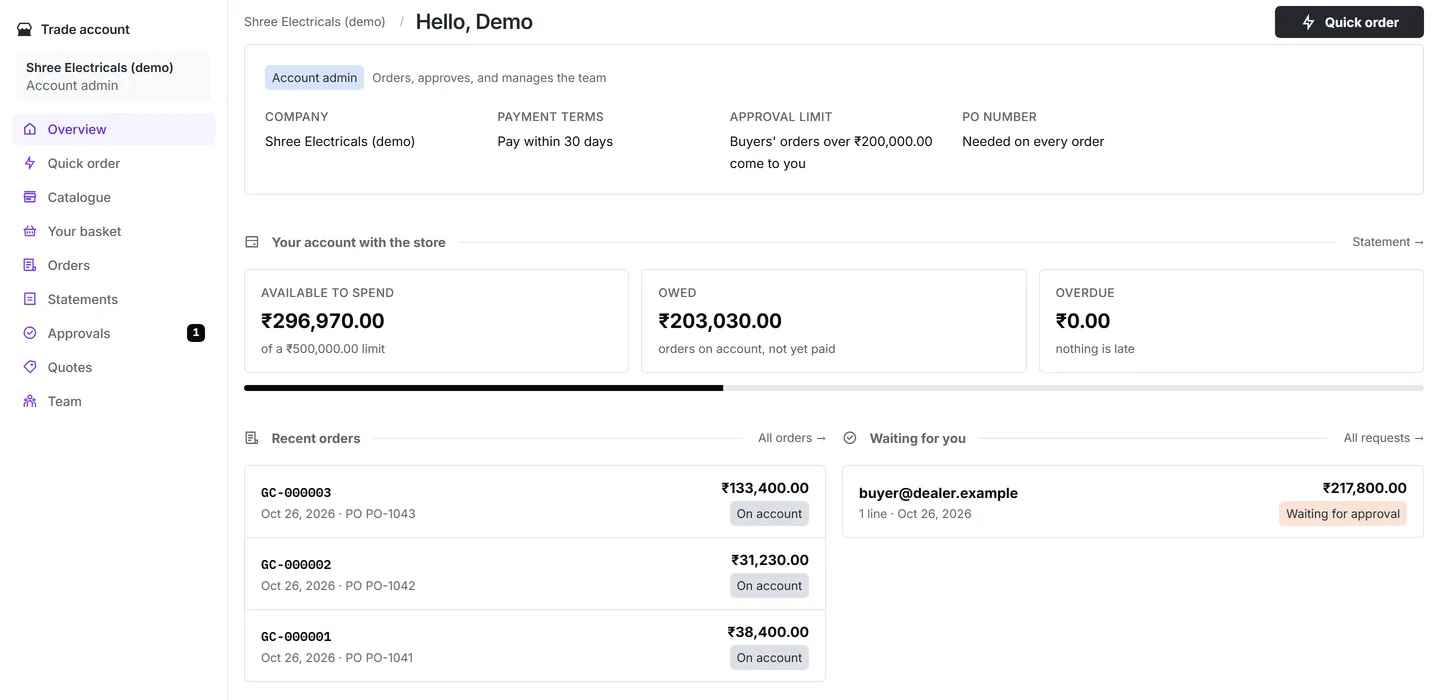
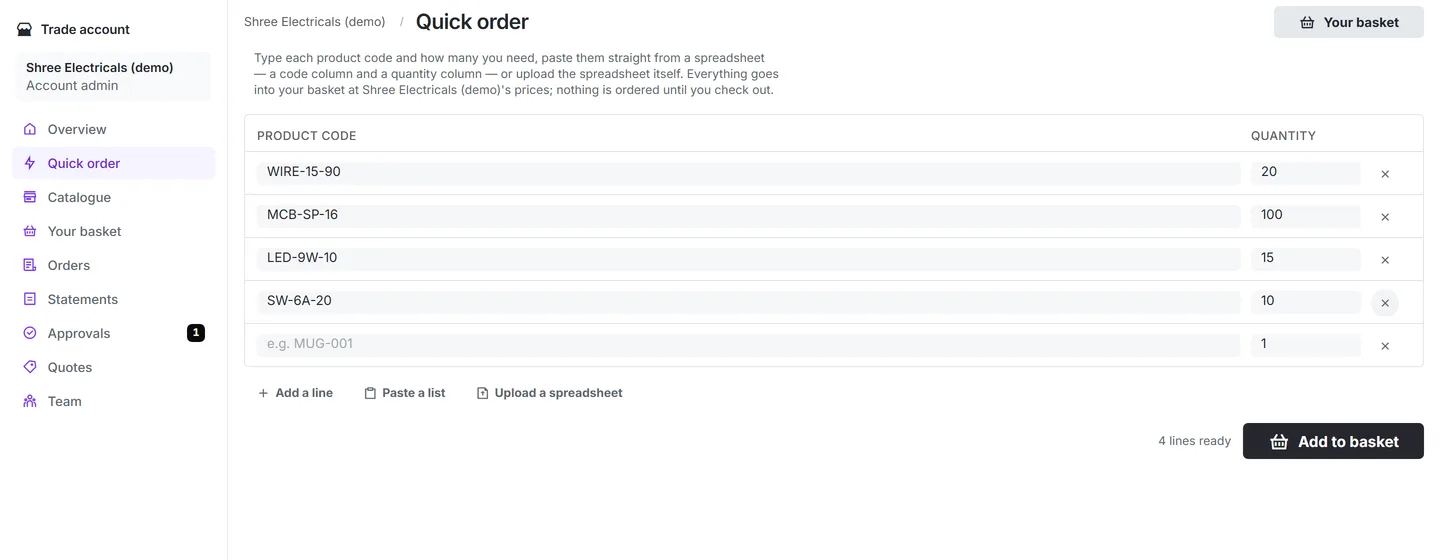
A dealer’s counter clerk pastes this week’s product codes and quantities into Quick order. The lines go into the basket at the dealer’s own prices, with any quantity price already applied, and lines the store cannot supply come back with the reason.
At checkout the order is checked against the dealer’s rules: the PO number if you require one, the approval amount and the credit limit. Under all three, it is confirmed on account with a due date. Over the approval amount, it waits for the dealer’s owner, who is emailed. Over the credit limit, it is refused before anything is reserved.
The order then sits on the dealer’s statement until you mark it paid, and you ship it the way you ship today, or book it with Shiprocket, Delhivery or NimbusPost from the admin.
What dealers or your accounts team may expect that the portal does not do yet.
In the portal, dealers order on account. Paying by UPI or card through Razorpay or Cashfree works on your store’s checkout, but not yet from the portal’s basket. Payments are recorded against whole orders, not part payments.
The GST tax invoice has no IRN or signed QR code, and no e-way bill is made: both need an account with a GST Suvidha Provider or the Invoice Registration Portal. A supplier whose turnover has passed ₹5 crore in any year since 2017-18 must e-invoice its sales to registered businesses, and still needs its billing software for that. A return or refund issues no GST credit note, and an order on account gets its tax invoice only when you mark it paid, not when it ships.Dealers cannot see or download their invoices in the portal: your team opens and prints them in the admin.
Product names can be in Hindi or another Indian language, but the portal’s own buttons and screens are English only.
Each dealer has one amount above which a staff order waits for approval. Approval chains and budgets per person are not there.
Enquiries reach the right dealer only when your website sends them. There is no ready-made “find a dealer” page to drop in.
Each dealer’s own online store keeps its own catalogue, stock and orders. Nothing is shared with yours or flows back to you automatically.
FAQ
A private website where your dealers sign in and order from you themselves, at their own prices and credit terms, instead of calling or messaging a salesperson. They also see their orders and what they owe.
No. The portal opens in any browser, on a phone or a computer, at /portal on your store’s address.
Yes. Put dealers in groups and give each group a price list, with lower prices at quantities you choose. A dealer only gets their group’s prices once their email address is confirmed.
The order is refused at checkout and the dealer is told how much credit is still available. Nothing is reserved and no order number is used. You can also put an account on hold, which stops ordering on credit until you lift it.
Only up to the amount you set for that dealer. Above it, the order waits for the dealer’s owner or approver, who is emailed and can approve or reject it.
Yes. The portal is served on the store’s own web address, and a store can use your domain once you verify it with a DNS record.
Start a store hosted on kitcommerce.store for 1% of every successful order, plus 18% GST on the fee, or run the open-source code on your own server for free. Either way the admin and the trade portal are on the store’s own web address.